In a previous post we walked through setting up an instance of the AWS Database Migration Service. In that build we used a DMS Replication Instance that we provisioned. At a high level, the implementation looked like this…
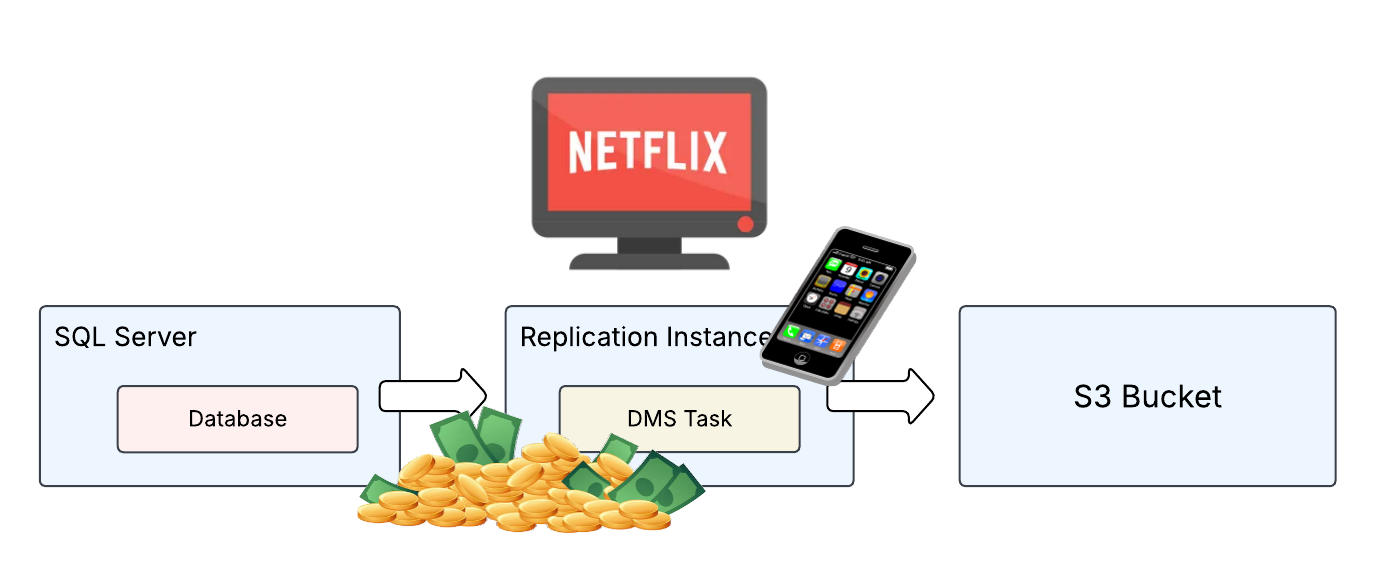
Well would you look at that! Our DMS Replication Instance is watching Netflix and playing on his phone! He’s not even working and he’s still costing us a ton of money! Yup, that’s how it works. Even if your instance isn’t actually performing a migration you are still going to be paying the full hourly rate for the server.
In our specific scenario we are only doing sporadic migrations so a dedicated instance isn’t the most efficient thing for us. Let’s go ahead and switch our implementation over to AWS DMS Serverless. Here’s what we have now…
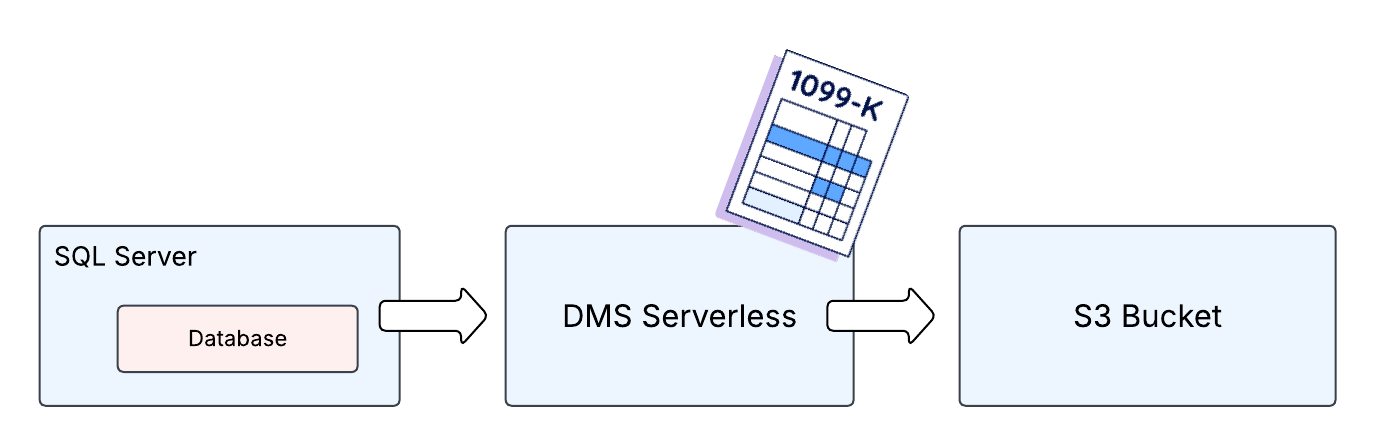
OK so things are looking better now. Our DMS Replication Instance was replaced with an AWS DMS Serverless configuration and now we only pay when the actual replications are taking place. So now that we’ve had a little fun let’s dig deeper into more specifics about how DMS Serverless works.
DMS Serverless And You
In my opinion, the actual AWS portion of the configuration to stand this service up is pretty simple. Now there is some further complexity AROUND this infrastructure you will need to build out but, assuming that stuff is already lined up, it really is just a matter at pointing a few settings towards it.
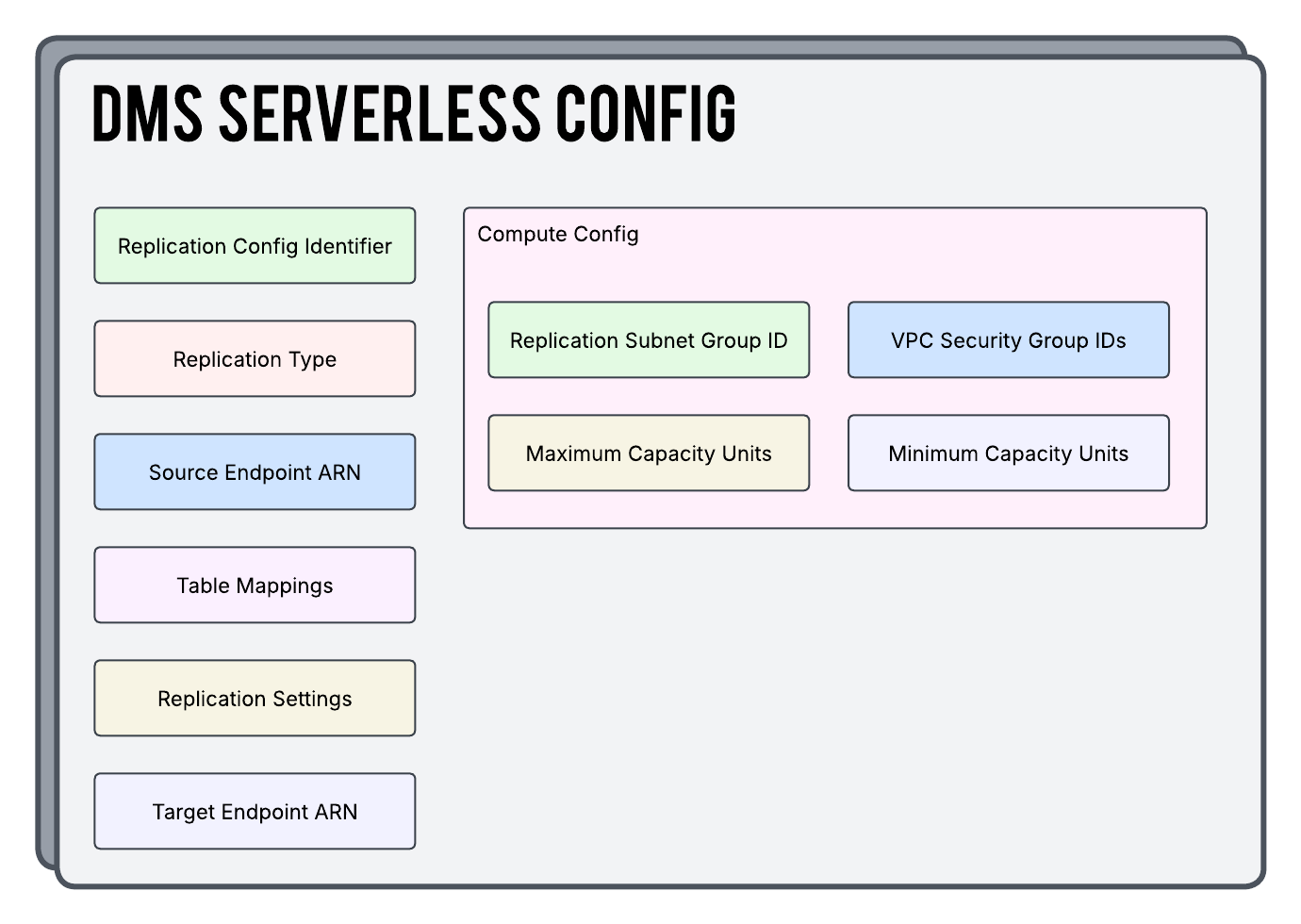
So let’s touch base on a few things you are seeing in the above diagram…
Source / Target ARN
You will of course need to point at WHAT you want to move and WHERE you want to move it and that is accomplished here. Be mindful of the fact that DMS Serverless supports a limited amount of these types of endpoints as compared to using a dedicated Replication Instance.
Replication Type
Here you will define HOW you want to move the data and you are given 3 options to choose from:
| Full Load | CDC | Full Load + CDC |
|---|---|---|
| A one time complete copy of all existing data from your source to your target | Replication ONLY data changes as they happen in the source database. It does not copy any of the data that already exists | Does an initial full copy and then transitions over to CDC mode every time after that |
Table Mappings
Table Mappings are the rules that tell the AWS DMS service exactly what to copy and how to copy it. These are written in JSON syntax.
Replication Settings
Replication Settings are a separate set of instructions around how you want the replication job to be run. Do you want logging? What should be done when an error happens? These settings are also written in a JSON syntax similar to the Table Mappings.
DMS Capacity Units

So WTF are DMS Capacity Units? Well, in a standard AWS DMS replication type that uses a dedicated instance to do the work you will be responsible for defining the instance size you want to use to do the work. The bigger the instance size the more power for the migration right? Well yeah but also remember that we started out talking about how you are paying for that instance whether it is working or not. So, the larger the instance size the more you’re gonna pay.
DMS Serverless actually auto-scales the power needed to do a migration but it lets you pick the minimum and maximum power range you want to scale between. The units of measurement the service uses to scale are called DMS Capacity Units and you will often just see the acronym for this term (DCU) be used in it’s place.
A single DCU is 2GB of RAM (plus associated CPU) and the ranges you can select for your minimum and maximum values are 1, 2, 4, 8, 16, 32, 64, 128, 192, 256, and 384. Holy Moly 384 sounds like an absolute beast!
How To Talk To Your Teenager About Terraform
OK so we can obviously build this out in the AWS console but it’s 2025 and we’re gonna follow best industry practices here and utilize Infrastructure as Code to lock in our builds. Here is what a basic implementation of AWS DMS Serverless looks like in Terraform. You can also grab this off of my Github as well.
providers.tf
We are going to initialize our AWS provider as well as populate our secret key and id so that it knows how to authenticate back to the AWS API.
provider "aws" {
  region  = var.aws_region
  access_key = "ASDFASDFASDFASDFASDFASDF"
  secret_key = "ASDFASDFASDFASDFASDFASDF"
}
terraform.tf
This is where we are going to define some high level configuration around how we want Terraform as a whole to operate.
terraform {
  required_version = ">= 1.12"

  required_providers {
    aws = {
      source  = "hashicorp/aws"
      version = ">= 6.4"
    }
  }
}
dms_serverless.tf
OK now that the necessary boring stuff is out of the way let’s look at the most important file here today. There’s not much here and it’s pretty straight forward but this is all you need to build out a serverless replication configuration.
As we discussed earlier up above there is definitely more complexity to put together around this file and then here we point this resource to all that stuff. If the Replication Type, Source Endpoint, and Replication Settings are The Avengers then the aws_dms_replication_config resource is Nick Fury.
# This Resource Is The Glue That Binds Everything Else Together
resource "aws_dms_replication_config" "sql_to_s3" {
  replication_config_identifier = "${var.environment}-sql-to-s3"
  replication_type              = "full-load"
  source_endpoint_arn           = aws_dms_endpoint.sql_source_endpoint.endpoint_arn
  target_endpoint_arn           = aws_dms_s3_endpoint.s3_target_endpoint.endpoint_arn
  table_mappings                = file("table-mappings.json")
  replication_settings          = file("replication-settings.json")

compute_config {
    replication_subnet_group_id = aws_dms_replication_subnet_group.serverless.replication_subnet_group_id
    vpc_security_group_ids      = [aws_security_group.serverless_task.id]
    max_capacity_units          = "64"
    min_capacity_units          = "8"
  }

  tags = {
    Name = "${var.environment}-sql-to-s3"
  }
}
dms_endpoints.tf
In this configuration we are using a Microsoft SQL source and an S3 Bucket as the target endpoint. A couple of things to note in this file…
-
Different endpoint types will commonly use different arguments to be able to successfully connect
-
The ARNs for the various IAM roles needed for permissions are assigned in these resources and not in the replication config
# This Represents The SQL Server We Are Pulling Data From
resource "aws_dms_endpoint" "sql_source_endpoint" {
  endpoint_id                     = "${var.environment}-sql-source"
  endpoint_type                   = "source"
  engine_name                     = "sqlserver"
  secrets_manager_arn             = aws_secretsmanager_secret.db_connection_info.arn # - Keep DB Connection Info Secret
  secrets_manager_access_role_arn = aws_iam_role.dms_role.arn
  database_name                   = "source-sql-db"

  tags = {
    Name = "${var.environment}-sql-source"
  }
}

# This Represents Our S3 Bucket Where We Are Sending The Data
resource "aws_dms_s3_endpoint" "s3_target_endpoint" {
  endpoint_id              = "${var.environment}-s3-target"
  endpoint_type            = "target"
  bucket_name              = var.target_bucket_name
  service_access_role_arn  = aws_iam_role.dms_role.arn
  csv_row_delimiter        = "\\n"
  csv_delimiter            = ","
  bucket_folder            = "taxo"
  compression_type         = "NONE"
  data_format              = "parquet"
  parquet_version          = "parquet-2-0"
  enable_statistics        = true
  include_op_for_full_load = true
  timestamp_column_name    = "ingestion_timestamp"
  date_partition_enabled   = false
  date_partition_sequence  = "yyyymmdd"
  date_partition_delimiter = "slash"
  add_column_name          = true
  cdc_max_batch_interval   = 3600
  cdc_min_file_size        = 64000


  tags = {
    Name = "${var.environment}-s3-target"
  }
}
dms_subnet_groups.tf
This resource is defining a group of subnets that we want to use for our serverless configuration to run inside of. We are then referencing this in our primary aws_dms_replication_config resource. This is entirely optional but can save you a lot of extra work and / or grief if you are mindful about the best subnets to use for your particular needs.
# Specify What Subnets We Want All Of This To Run In
resource "aws_dms_replication_subnet_group" "serverless" {
  replication_subnet_group_description = "Subnets to use for ${var.environment}-sql-to-s3 serverless migrations"
  replication_subnet_group_id          = "${var.environment}-sql-to-s3"
  subnet_ids                           = data.aws_subnets.subnet_ids.ids

  tags = {
    Name = "${var.environment}-sql-to-s3"
  }
}
security_groups.tf
So our serverless configuration has Security Group(s) that are assigned to it and we define all of that here. For the DMS Serverless service we actually don’t need ANY ingress rules because we will be reaching outbound 100% of the time and remember that SGs are stateful.
As far as outbound communications go we need to be able to reach our endpoints on whichever ports are required for those DB types to function. In our scenario here we are just allowing everything outbound but you might want to restrict it down on your end and say something like “allow port 1433 outbound to my SQL server.”
# This SG Is Assigned To The Serverless Replication Configuration
resource "aws_security_group" "serverless_task" {
  name        = "${var.environment}-dms-sg"
  description = "Used for Serverless DMS Tasks"
  vpc_id      = data.aws_vpc.serverless.id

  tags = {
    Name = "${var.environment}-dms-sg"
  }

}

# Allow All Traffic Outbound To All Sources
resource "aws_vpc_security_group_egress_rule" "allow_all_out" {
  security_group_id = aws_security_group.serverless_task.id
  cidr_ipv4         = "0.0.0.0/0"
  ip_protocol       = "-1"
}
secrets.tf
In an effort to keep important data as secure as possible we are choosing to keep all of our database connection details locked away in an AWS secret. This resource is creating the secret but it is not populating the connection information. After this resource has been created I would then manually login to the AWS console and add the info. This keeps the information out of version control and we can also use the security mechanisms provided by AWS to ensure only the correct people have access moving forward.
# Contains All Of Our DB Connection Info For Security Purposes
resource "aws_secretsmanager_secret" "db_connection_info" {
  name = "${var.environment}-db-connection-info"
}
iam.tf
We need to accomplish two things with IAM permissions in this build…
-
Be able to write to our S3 bucket endpoint
-
Read from AWS Secrets Manager so we can see the DB connection details we keep in the secret
As you can see we are doing both of those in a single role below. You can of course split this up as needed to suit your purposes. Note that in a Serverless configuration there is also a service-linked role named AWSServiceRoleForDMSServerless that AWS creates and uses behind the scenes here.
# Build DMS Assume Role
data "aws_iam_policy_document" "assume_role" {
  statement {
    effect = "Allow"

    principals {
      type        = "Service"
      identifiers = ["dms.amazonaws.com"]
    }

    actions = ["sts:AssumeRole"]
  }
}

# IAM Role For All Needed DMS Permissions
resource "aws_iam_role" "dms_role" {
  name               = "${var.environment}-dms-role"
  assume_role_policy = data.aws_iam_policy_document.assume_role.json
}

# Provides The Inline Policy To The Role
resource "aws_iam_role_policy" "inline_policy" {
  name   = "inline_policy"
  role   = aws_iam_role.dms_role.id
  policy = data.aws_iam_policy_document.inline_policy.json
}

# DMS Role Inline Policy Document
data "aws_iam_policy_document" "inline_policy" {
  statement {
    sid = "DmsPermissions"
    actions = [
      "secretsmanager:GetSecretValue",
      "secretsmanager:DescribeSecret"
    ]
    resources = [aws_secretsmanager_secret.db_connection_info]
  }
  statement {
    sid = "DmsS3Permissions"
    actions = [
      "s3:PutObject",
      "s3:PutObjectAcl",
      "s3:ListBucket",
      "s3:GetBucketLocation",
      "s3:DeleteObject"
    ]
    resources = [
      "arn:aws:s3:::${var.target_bucket_name}",
      "arn:aws:s3:::${var.target_bucket_name}/*"
    ]
  }
}
table-mappings.json
This is what the structure would look like to define what / how is being moved from the source to target. You can find more information on the proper syntax here.
{
    "rules": [
        {
            "rule-type": "selection",
            "rule-id": "015552122",
            "rule-name": "962748620",
            "object-locator": {
                "schema-name": "dbo",
                "table-name": "tbldev"
            },
            "rule-action": "include",
            "filters": []
        },
        {
            "rule-type": "selection",
            "rule-id": "962897620",
            "rule-name": "962849360",
            "object-locator": {
                "schema-name": "dbo",
                "table-name": "tbldev"
            },
            "rule-action": "include",
            "filters": []
        }
    ]
}
replication-settings.json
This is what the structure of your Replication Settings JSON file would look like. This is the same thing as the Task Settings when you are using a dedicated replication instance. In the past I have been able to cleanly drag and drop from one to the other as I was moving an existing task to a serverless configuration.
{
    "Logging": {
        "EnableLogging": true,
        "EnableLogContext": true,
        "LogComponents": [
            {
                "Severity": "LOGGER_SEVERITY_DEFAULT",
                "Id": "TRANSFORMATION"
            },
            {
                "Severity": "LOGGER_SEVERITY_DEFAULT",
                "Id": "SOURCE_UNLOAD"
            },
            {
                "Severity": "LOGGER_SEVERITY_DEFAULT",
                "Id": "IO"
            },
            {
                "Severity": "LOGGER_SEVERITY_DEFAULT",
                "Id": "TARGET_LOAD"
            }
        ]
    },
    "StreamBufferSettings": {
        "StreamBufferCount": 3,
        "CtrlStreamBufferSizeInMB": 5,
        "StreamBufferSizeInMB": 8
    },
    "ErrorBehavior": {
        "FailOnNoTablesCaptured": true,
        "ApplyErrorUpdatePolicy": "LOG_ERROR",
        "FailOnTransactionConsistencyBreached": false
    },
    "TTSettings": {
        "TTS3Settings": null,
        "TTRecordSettings": null,
        "EnableTT": false
    },
    "FullLoadSettings": {
        "CommitRate": 10000,
        "StopTaskCachedChangesApplied": false,
        "StopTaskCachedChangesNotApplied": false,
        "MaxFullLoadSubTasks": 8
    },
    "TargetMetadata": {
        "ParallelApplyBufferSize": 0,
        "ParallelApplyQueuesPerThread": 0,
        "ParallelApplyThreads": 0,
        "TargetSchema": ""
    },
    "BeforeImageSettings": null,
    "ControlTablesSettings": {
        "historyTimeslotInMinutes": 5,
        "CommitPositionTableEnabled": false,
        "HistoryTimeslotInMinutes": 5,
        "StatusTableEnabled": false
    },
    "LoopbackPreventionSettings": null,
    "CharacterSetSettings": null,
    "FailTaskWhenCleanTaskResourceFailed": false,
    "ChangeProcessingTuning": {
        "StatementCacheSize": 50,
        "CommitTimeout": 1
    },
    "ChangeProcessingDdlHandlingPolicy": {
        "HandleSourceTableDropped": true,
        "HandleSourceTableTruncated": true,
        "HandleSourceTableAltered": true
    },
    "PostProcessingRules": null
}
data.tf
Some of this build is going to plug into existing AWS infrastructure that already exists. In order to be able to reference that information we need to pull them in using data sources.
# Look Up Existing Subnets So We Can Assign Then To Our DMS Replication Subnet Group Resource
data "aws_subnets" "subnet_ids" {
  filter {
    name   = "tag:Name"
    values = var.subnet_names
  }
}


# Look Up An Existing VPC To Feed It Into Our Security Group Resource
data "aws_vpc" "serverless" {
  filter {
    name   = "tag:Name"
    values = [var.vpc_name]
  }
}
variables.tf
And of course like in any build we are gonna have some variables. These should all be pretty self explanatory.
variable "aws_region" {
  description = "AWS region identifier for created resources."
  type        = string
}

variable "availability_zone" {
  description = "AWS AZ identifier for created resources."
  type        = string
}

variable "target_bucket_name" {
  description = "The name of the target S3 bucket."
  type        = string
}

variable "vpc_name" {
  description = "The name of the VPC where the task lives."
  type        = string
}

variable "subnet_names" {
  description = "The names of the existing subnets that will be used in the DMS Replication Subnet Group."
  type        = set(string)
}

variable "environment" {
  description = "The environment in which we are building the infrastructure."
  type        = string
}
terraform.tfvars
Here we are assigning actual values to the variables we have defined above.
aws_region = "us-east-1"

target_bucket_name = "target_s3_bucket"

availability_zone = "us-east-1a"

# Used to dynamically build out subnets local variable
subnet_names = [
  "db-subnet-1",
  "db-subnet-2"
]

vpc_name = "db-vpc"

environment = "development"
That’s All For Now
Hopefully this was helpful in quickly getting you up to speed on some concepts around AWS DMS Serverless. Whether you are building a brand new configuration or even migrating an existing task using a dedicated instance the high level pieces are not too bad at all.

Start the conversation