I am definitely not a Database Expert! But, if you are anything like me, your various roles have required you to jump in and out of that world once or twice a year. Enough to get your boots a little muddy. I was recently tasked with standing up an instance of the AWS Database Migration Service at work and I definitely had that brief wave of anxiety hit me.
But……as always, it wasn’t that bad at all once you get into it. The AWS side of things is pretty straight forward and if you come into this with a smidge of DB knowledge I think you’ll find it a rewarding experience. Kind of like an after school special where everybody learned a little bit more about themselves that day.
WTF Is A DMS And Why Should I Care?
AWS Database Migration Service (DMS) is basically Amazon’s moving truck for databases. It picks up your data from one database and delivers it safely to another. This tool can do this on AWS, between AWS services, or even from a different cloud or on-prem system. And here are two other REALLY neat parts…
- It can migrate between different database engines! Think Oracle -> PostgreSQL or SQL Server -> Amazon Aurora.
- It also keeps the source database running while the move happens! It’s often used for cloud migrations, upgrades, or consolidating multiple databases into one.
Standard Vs. Serverless
| Feature | DMS Standard | DMS Serverless |
|---|---|---|
| Compute | Dedicated Replication Instance | AWS Managed Compute |
| Scaling | Fixed Capacity / You Adjust | Elastic Scaling Based On Demand |
| Management | You Manage Networking, Instance Sizing, Patching | Managed By AWS |
| Pricing | Billed Per Hour For The Instance | Billed By Capacity Units Used During Replication |
| Use Cases | You Want Tight Control | You Want Simplicity |
| Supported Endpoints | All DMS Supported Engines & Endpoints | *Not Yet 100% But Growing |
| Maturity | An Old Wise Man | A Cool Older Cousin |
The Basics
Below is an overview of the configuration we are talking about today. As you can see, it’s honestly pretty simple at a high level. The Replication Instance sits in the middle and does the work of pulling the data out of SQL Server, massaging it as needed, and then putting it into the endpoint. In our case we are putting this information into an S3 Bucket to act as a data lake.

Let’s Dive Deepers
Now let’s zoom in a bit and break apart some of the individual pieces!
Replication Instance
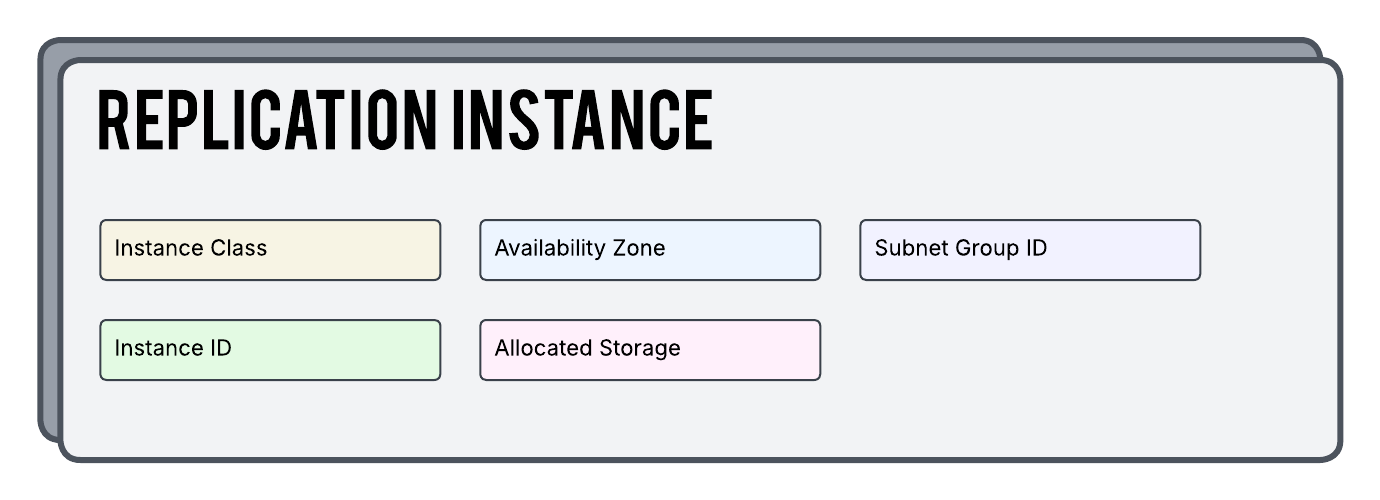
Since we are using DMS Standard we are going to need a dedicated Replication Instance to do all of the grunt work. Configuration of this instance is pretty simple as you can see in the diagram below. The Instance Class value is required and is how we are manually defining the EC2 instance size we want to use for our specific Replication Tasks.
Also, please be mindful of the fact that you are billed as long as your instance is online and in a running state. Even if you are not running a task, the instance is costing you money. You might want to get a system in place to power this down when not in use.
Replication Task
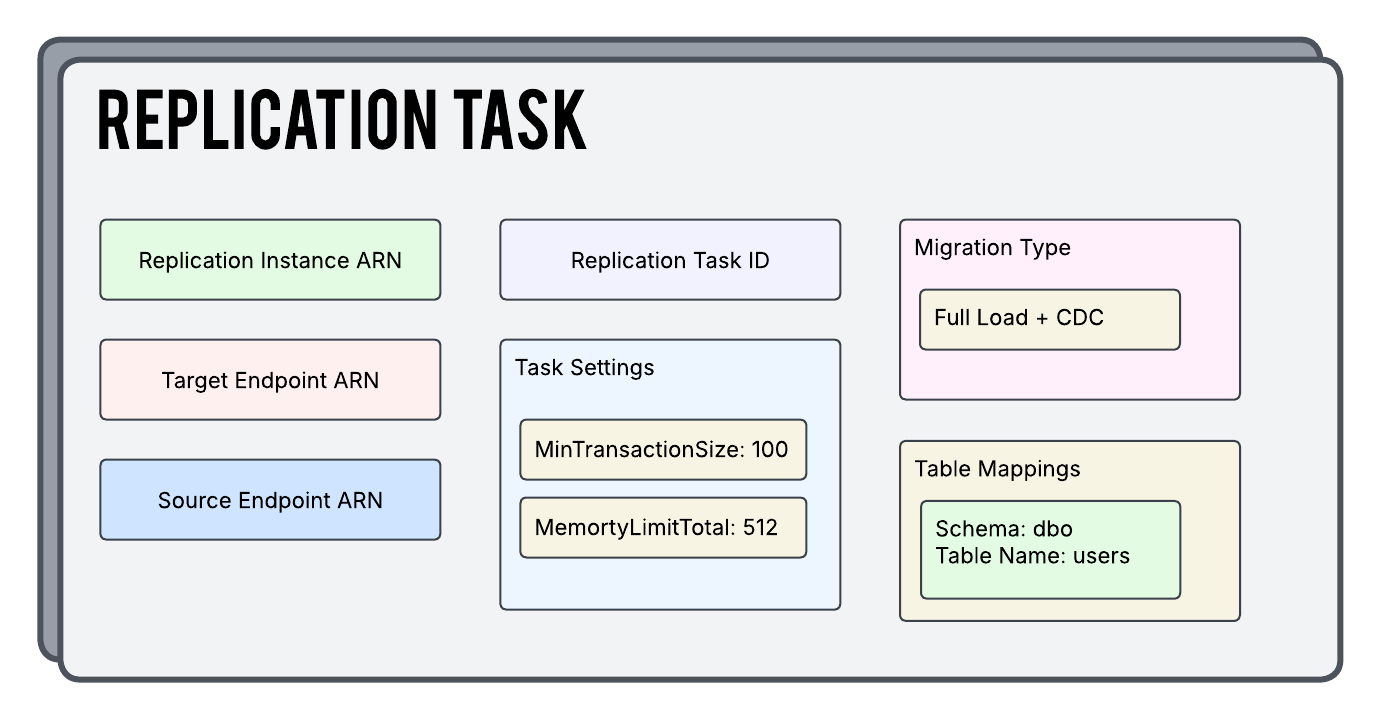
This might be the most intricate part of our setup today. The Replication Task is the brains behind this entire process. It points to a Replication Instance and then uses it to actually move the data between the endpoints. You’ll also notice that this is where settings and mappings between the two endpoints are defined and used along the way.
Replication Endpoints
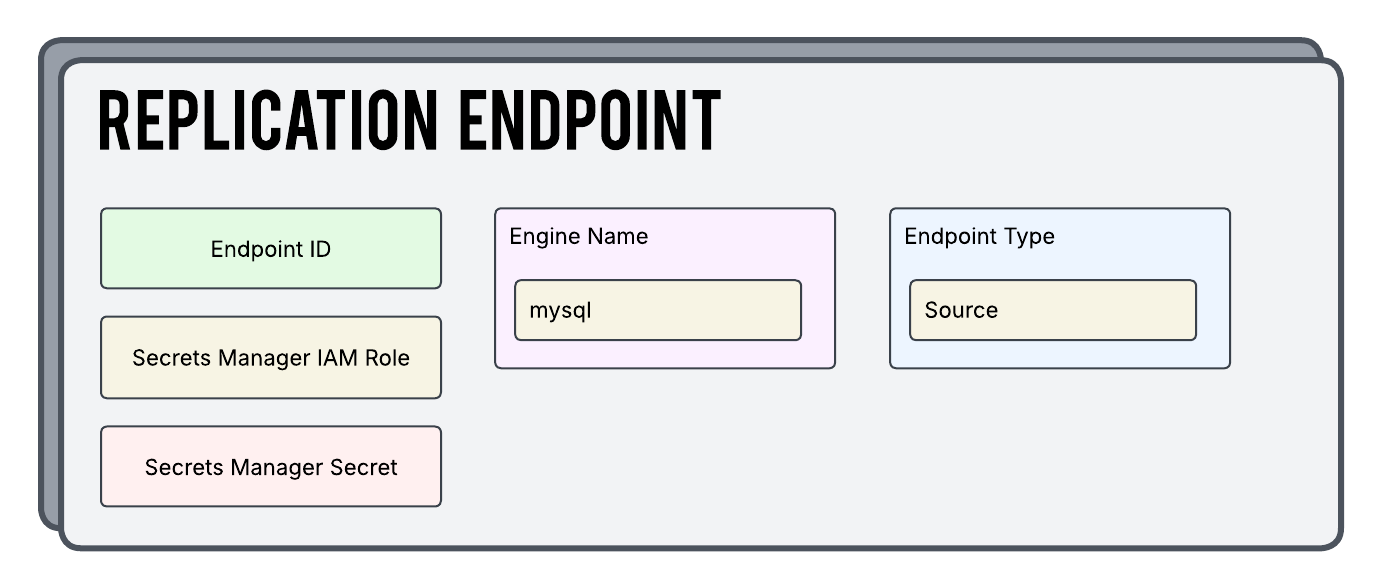
The Replication Endpoint component is used to define both the source and target endpoints you are working with. The settings here include definitions around the database type the endpoint represents and also the actual details to connect to the database.
One thing I particular I wanted to call out is the Secrets Manager Secret setting. In most scenarios the details used to actually connect to the database are sensitive and you want to keep them locked away as tight as possible. That is what we are doing here. The Secret that we are pointing to holds those connection details.
You CAN define those settings directly in the endpoint configuration itself if you like but your grandfather will look down from heaven and sigh in shame.
S3 Replication Endpoints
So as we touched on above, there are many different types of endpoints you can use as both a source and target for your migrations. Many of them are unique and will have specific settings or configurations that aren’t used on the others. What that being said, I did want to specifically call out S3 Replication Endpoints for two reasons.
- We are using one in our example here today
- Out of all of the “edge case” endpoint types, S3 is probably one of the more extreme examples
So what makes S3 so different? Well you might have noticed that S3 isn’t a database! Other endpoints like Oracle or PostgreSQL understand schemas and support transactions. S3 is nothing more than an object store. While more traditional engines are neat and organized by default S3 is a giant bucket where we throw everything in and rummage around.
There is one last thing I want to call out about S3 endpoints. When DMS moves files in or out of S3 it also puts supporting control files in the bucket that act as metadata and checkpoints. These files help the other processes understand what’s been loaded, how to interpret it, and more.
Slather Some Terraform On That
So now let’s take a look at a basic configuration in Terraform for reference. Please note that you can also find this in my Github account.
providers.tf
We are going to initialize our AWS provider as well as populate our secret key and id so that it knows how to authenticate back to the AWS API.
provider "aws" {
  region  = var.aws_region
  access_key = "ASDFASDFASDFASDFASDFASDF"
  secret_key = "ASDFASDFASDFASDFASDFASDF"
}
terraform.tf
This is where we are going to define some high level configuration around how we want Terraform as a whole to operate.
terraform {
  required_version = ">= 1.12"

  required_providers {
    aws = {
      source  = "hashicorp/aws"
      version = ">= 6.4"
    }
  }
}
data.tf
Query our current account and also the existing subnets out there we are operating in.
# Lets Us Get Access To Account Information
data "aws_caller_identity" "current" {}

# Which Subnets DMS Is Allowed To Use
data "aws_subnets" "subnet" {
  filter {
    name   = "tag:Name"
    values = var.subnets
  }
}
tasks.tf
Glue it all together with tasks…
resource "aws_dms_replication_task" "dms_dev_replication" {
  migration_type            = "full-load-and-cdc"
  replication_instance_arn  = aws_dms_replication_instance.instance.replication_instance_arn
  replication_task_id       = "dms-${var.environment}-task"
  source_endpoint_arn       = aws_dms_endpoint.dms_dev_sql_source.endpoint_arn
  target_endpoint_arn       = aws_dms_s3_endpoint.dms_dev_s3_target.endpoint_arn
  table_mappings            = file("table-mappings.json")
  replication_task_settings = file("task-settings.json")

  tags = {
    Name = "${var.environment}-dms-replication"
  }
}
endpoints.tf
Define all of our endpoints here in this file. Note that different types of endpoints will have different arguments.
# Our Source SQL Server Endpoint We Are Pulling Data From
resource "aws_dms_endpoint" "dms_dev_sql_source" {
  endpoint_id                     = "dms-${var.environment}-sql-source"
  endpoint_type                   = "source"
  engine_name                     = "sqlserver"
  secrets_manager_arn             = aws_secretsmanager_secret.db_connection_info.arn # - Keep DB Connection Info Secret
  secrets_manager_access_role_arn = aws_iam_role.dms_dev_permissions.arn # - Role To Access Secrets Manager

  tags = {
    Name = "dms-${var.environment}-sql-source"
  }
}

# Our Target S3 Bucket We Are Migrating Data Into
resource "aws_dms_s3_endpoint" "dms_dev_s3_target" {
  endpoint_id              = "dms-${var.environment}-s3-target"
  endpoint_type            = "target"
  bucket_name              = var.target_bucket_name
  service_access_role_arn  = aws_iam_role.dms_dev_permissions.arn # - Role To Access Bucket Resources
  csv_row_delimiter        = "\\n"
  csv_delimiter            = ","
  bucket_folder            = "dev_sql_db"
  compression_type         = "NONE"
  data_format              = "parquet"
  parquet_version          = "parquet-2-0"
  enable_statistics        = true
  include_op_for_full_load = true
  timestamp_column_name    = "ingestion_timestamp"
  date_partition_enabled   = false
  date_partition_sequence  = "yyyymmdd"
  date_partition_delimiter = "slash"
  add_column_name          = true
  cdc_max_batch_interval   = 3600
  cdc_min_file_size        = 64000


  tags = {
    Name = "dms-${var.environment}-s3-target"
  }
}
instances.tf
If the tasks are the brains the instances are the muscle. Remember, that you are getting billed for these instances 24/7 even if they are not currently running any migration jobs.
resource "aws_dms_replication_instance" "instance" {
  replication_instance_class  = var.instance_class
  replication_instance_id     = "dms-${var.environment}-replication"
  allocated_storage           = 50
  availability_zone           = var.availability_zone
  replication_subnet_group_id = aws_dms_replication_subnet_group.instance.replication_subnet_group_id

  tags = {
    Name = "dms-${var.environment}-replication"
  }
}

resource "aws_dms_replication_subnet_group" "instance" {
  replication_subnet_group_description = "Subnets to use for dms-${var.environment}-replication instance"
  replication_subnet_group_id          = "dms-${var.environment}-replication"
  subnet_ids                           = data.aws_subnets.subnet.ids

  tags = {
    Name = "dms-${var.environment}-replication"
  }
}
secrets.tf
Notice we are creating the secret here but not providing it a value. We want to try to keep this as secure as possible by keeping it out of terraform state and our repos. I went back in and manually populated the information in the AWS console after the secret was built.
resource "aws_secretsmanager_secret" "db_connection_info" {
    name = "dms-${var.environment}-db-connection-info"
}
iam.tf
We need to be able to authenticate to our S3 Endpoint and also our Secret resource and this is the role we will use.
# Allow The DMS Service To Assume The Role
data "aws_iam_policy_document" "assume_role" {
  statement {
    effect = "Allow"

    principals {
      type        = "Service"
      identifiers = ["dms.amazonaws.com"]
    }

    actions = ["sts:AssumeRole"]
  }
}

# IAM Role To Assign To Our Instance
resource "aws_iam_role" "dms_dev_permissions" {
  name               = "dms-${var.environment}-dms-permissions"
  assume_role_policy = data.aws_iam_policy_document.assume_role.json
}

# Provides The Inline Policy To The Role
resource "aws_iam_role_policy" "inline_policy" {
  name   = "inline_policy"
  role   = aws_iam_role.dms_dev_permissions.id
  policy = data.aws_iam_policy_document.inline_policy.json
}

# DMS Role Inline Policy Document
data "aws_iam_policy_document" "inline_policy" {
  statement {
    sid = "DmsPermissions"
    actions = [
      "secretsmanager:GetSecretValue",
      "secretsmanager:DescribeSecret"
    ]
    resources = [aws_secretsmanager_secret.db_connection_info]
  }
  statement {
    sid = "DmsS3Permissions"
    actions = [
      "s3:PutObject",
      "s3:PutObjectAcl",
      "s3:ListBucket",
      "s3:GetBucketLocation",
      "s3:DeleteObject"
    ]
    resources = [
      "arn:aws:s3:::${var.target_bucket_name}",
      "arn:aws:s3:::${var.target_bucket_name}/*"
    ]
  }
}
table-mappings.json
This file uses several types of rules to specify the data source, source schema, data, and any transformations that should occur during the task. You can use table mapping to specify individual tables in a database to migrate and the schema to use for the migration.
{
    "rules": [
        {
            "rule-type": "selection",
            "rule-id": "015552122",
            "rule-name": "962748620",
            "object-locator": {
                "schema-name": "dbo",
                "table-name": "tbldev"
            },
            "rule-action": "include",
            "filters": []
        },
        {
            "rule-type": "selection",
            "rule-id": "962897620",
            "rule-name": "962849360",
            "object-locator": {
                "schema-name": "dbo",
                "table-name": "tbldev"
            },
            "rule-action": "include",
            "filters": []
        }
    ]
}
task-settings.json
A giant file that defines a lot of the task settings we want to configure.
{
    "Logging": {
        "EnableLogging": true,
        "EnableLogContext": true,
        "LogComponents": [
            {
                "Severity": "LOGGER_SEVERITY_DEFAULT",
                "Id": "TRANSFORMATION"
            },
            {
                "Severity": "LOGGER_SEVERITY_DEFAULT",
                "Id": "SOURCE_UNLOAD"
            },
            {
                "Severity": "LOGGER_SEVERITY_DEFAULT",
                "Id": "IO"
            },
            {
                "Severity": "LOGGER_SEVERITY_DEFAULT",
                "Id": "TARGET_LOAD"
            }
        ]
    },
    "StreamBufferSettings": {
        "StreamBufferCount": 3,
        "CtrlStreamBufferSizeInMB": 5,
        "StreamBufferSizeInMB": 8
    },
    "ErrorBehavior": {
        "FailOnNoTablesCaptured": true,
        "ApplyErrorUpdatePolicy": "LOG_ERROR",
        "FailOnTransactionConsistencyBreached": false,
    },
    "TTSettings": {
        "TTS3Settings": null,
        "TTRecordSettings": null,
        "EnableTT": false
    },
    "FullLoadSettings": {
        "CommitRate": 10000,
        "StopTaskCachedChangesApplied": false,
        "StopTaskCachedChangesNotApplied": false,
        "MaxFullLoadSubTasks": 8,
    },
    "TargetMetadata": {
        "ParallelApplyBufferSize": 0,
        "ParallelApplyQueuesPerThread": 0,
        "ParallelApplyThreads": 0,
        "TargetSchema": ""
    },
    "BeforeImageSettings": null,
    "ControlTablesSettings": {
        "historyTimeslotInMinutes": 5,
        "CommitPositionTableEnabled": false,
        "HistoryTimeslotInMinutes": 5,
        "StatusTableEnabled": false
    },
    "LoopbackPreventionSettings": null,
    "CharacterSetSettings": null,
    "FailTaskWhenCleanTaskResourceFailed": false,
    "ChangeProcessingTuning": {
        "StatementCacheSize": 50,
        "CommitTimeout": 1,
    },
    "ChangeProcessingDdlHandlingPolicy": {
        "HandleSourceTableDropped": true,
        "HandleSourceTableTruncated": true,
        "HandleSourceTableAltered": true
    },
    "PostProcessingRules": null
}
variables.tf
Define all the variables we will be using in the configuration.
variable "aws_region" {
  description = "AWS region identifier for created resources."
  type        = string
}

variable "environment" {
  description = "Which environment we are working in."
  type        = string
}

variable "availability_zone" {
  description = "AWS AZ identifier for created resources."
  type        = string
}

variable "target_bucket_name" {
  description = "The name of the target S3 bucket."
  type        = string
}

variable "instance_class" {
  description = "The class of the replication instance."
  type        = string
}

variable "subnets" {
  description = "Subnets in which to deploy the infrastructure (minimum 2 required)"
  type        = set(string)
}
terraform.tfvars
Assign values to our variables that we defined in variables.tf
aws_region = "us-east-1"

environment = "dev"

target_bucket_name = "dms-${var.environment}-s3-target"

availability_zone = "us-east-1a"

instance_class = "dms.r5.4xlarge"

subnets = [
  "dms-${var.default_tags["alk:env"]}-sql",
  "dms-${var.default_tags["alk:env"]}-sql2",
]
In Conclusion
So that’s pretty much it for now. To reiterate, the goal here primarily was to give a high level overview of this service for somebody who might NOT be a database expert. If you are working alongside a DBA the AWS side of this is not bad at all.

Start the conversation